
How to Use Skyscanner to Find Cheap Flights Anywhere in the World
Learn how you can use Skyscanner to find cheap flights any time of the year to save money and make your travel dreams a reality!
Finding cheap flights can be a daunting task, but with the right tools, it can be easy. One of the best tools is Skyscanner, a flight search engine to help you find cheap deals on flights to your desired destination.
Click the table of contents to browse through how to use Skyscanner to find cheap flights!
How to Use Skyscanner
What is Skyscanner?
Skyscanner is a flight search engine that can help you find the best deals on flights to your desired destination.
Skyscanner is simple and easy to use – just enter your departure city and destination, and the dates you want to travel, and Skyscanner will show you a list of the cheapest flight tickets available.
Unlike other online travel agencies or OTA, Skyscanner compiles airfares from different airlines and then redirects you to book the tickets on the airlines’ websites.
Skyscanner does not book flights for you like Expedia or Orbitz, which are OTAs.
>> Book your flight with Skyscanner here! <<
How to Use Skyscanner
How to use Skyscanner to Find Cheap Flights
How to Search for a Cheap Flight with Skyscanner
Say you are looking for a domestic flight from San Francisco to Denver. To give you the most options, you can leave the airports open to “any” in Denver and make sure to check “nearby airports” for San Francisco.

Pro-tip: You can compare prices between both round-trip and one-way tickets to see if there are even more savings.
How to Set Flexible Locations for Cheap Flights with Skyscanner
If you aren’t sure where you want to go, or you want to be able to find the cheapest flights possible, you can set your departure to “everywhere.”

This means that Skyscanner will search for cheap flights departing from your chosen departure airport to any destination.
Although most people may already have a trip planned and are looking for a specific flight pattern, being flexible with your location will immensely increase your chances of finding a cheaper flight with Skyscanner.

How to Set Flexible Dates on Skyscanner for Cheap Flights
Flexible travel dates will also increase your chances of finding cheaper tickets. Before you start planning your trip and requesting PTO for specific dates, jump onto Skyscanner’s flexible date flights to see what prices will look like so you can start planning ahead.

To set flexible dates on Skyscanner, click on the departure date and select “whole month” or even “cheapest month.” This will show you a calendar of the cheapest dates to fly for the entire month so you can plan your trip around those dates.

You can also set a flexible date range by clicking on the return date and selecting “flexible.” This will show you a calendar with cheaper flights within a certain time period, giving you more options to choose from.
How to Use Skyscanner Multi-City Flight Search
If you are wanting to visit multiple destinations on your trip, Skyscanner offers a multi-city flight search that will allow you to find the cheapest flights between all of your chosen destinations.
To use the multi-city flight search on Skyscanner, enter your departure city, and then add the number of stops you want to make as well as your return flight.

You can add up to six different destinations and Skyscanner will show you the cheapest flights available between all of those cities.
This is a great way to find cheap flights if you are wanting to visit multiple places on your trip.
However, you may find that sometimes purchasing each leg separately may yield different prices as well, especially for international flights, so always compare prices!
How to Use Skyscanner One-Way Flight Search
If you are only looking to fly one way, Skyscanner also offers a one-way flight search.
To use the one-way flight search on Skyscanner, enter your departure city and your arrival city. You can also choose to see the cheapest flights or the fastest flights.
This is a great way to find cheap flights if you only need to fly one way. This tool will help you immensely if you are planning to visit multiple places and would like to compare prices with a multi-city search.
How to View Skyscanner Cheap Flight Results
After you have entered your departure city and destination, Skyscanner will show search results for the “best” flights, “cheapest” fares, and “fastest” times.
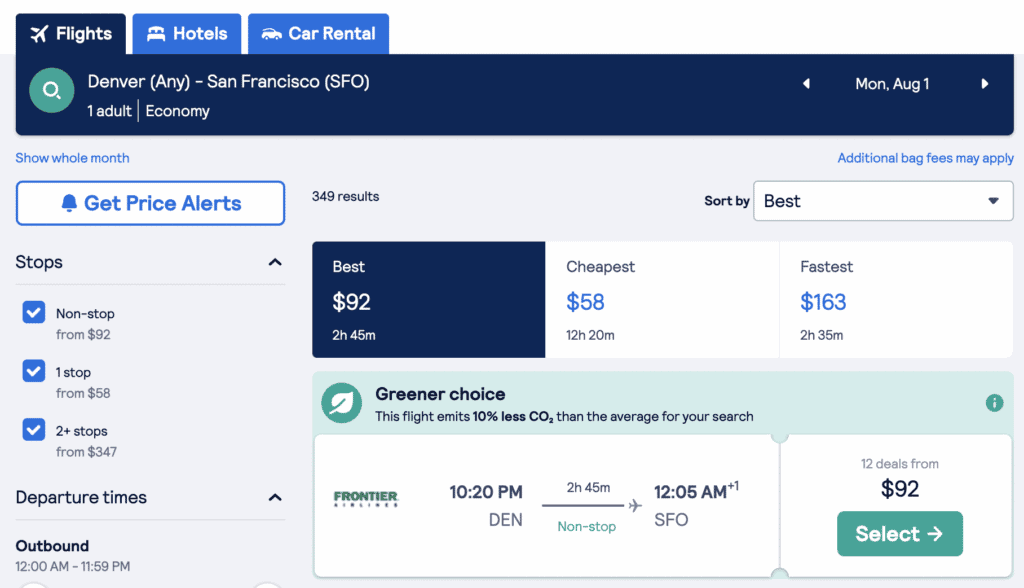
Best flights will provide you with the best fares with the best travel time, whereas the cheapest flights may have 3x the time to travel and the fastest travel time will cost a little more.

From here, you will be able to choose from all the great deals. If none of the options presented fit what you are looking for, you can then start filtering your search results.
How to Filter Results of Cheap Flights with Skyscanner
After you click “search flights,” you’ll receive a list of all available flights with the cheapest prices.

To further filter your results, there are many different filters that you can use on Skyscanner to help you find the best option for your needs.
On the left-hand side of the screen, you’ll find options for non-stop flights, arrival and departure times, and flight duration. You can even select airlines if you are a rewards member of a particular airline.
How to Set Price Alerts for Cheap Flights with Skyscanner
Flight prices are constantly changing. If you are just browsing flights and not prepared to buy just yet, you can set a price alert for Skyscanner to update you when a price changes.
To set a price alert for cheap flights with Skyscanner, you can click the button and enter your information such as name and email. Skyscanner will then send you an email to notify you.

How to Use Skyscanner
How to Book a Cheap flight with Skyscanner
When you find a flight that meets your needs, Skyscanner will provide you with a list of booking options. You will most likely not be booking your flight directly on Skyscanner.
Instead, Skyscanner will direct you to the OTA or airline’s website, and you will book your flight from there. This does mean that sometimes Skyscanner’s fees may not be what you see on the website it directs you to.
Book your flight with Skyscanner here!
Let’s take a look.
To get from San Francisco to Miami, there’s a flight for $483 with American Airlines. Skyscanner is showing that you can purchase directly through the airline and not through an OTA, which is great! (See American Airlines with 5 starts at the bottom left)

Once you click the “select” button, Skyscanner will take you to the fare. In this case, Skyscanner took us to American Airlines’ website with the correct booking and price.

Pro-tip: Sometimes, Skyscanner will provide you with a list of OTA’s instead and have you choose from one of them (i.e. Expedia, Orbitz, etc.) If this happens, make sure to double-check the fare rules for baggage allowances, seat selection, and fees.
When you get to American Airlines’ website, enter your personal information and purchase your ticket using a credit card. You will get a confirmation email from them directly.
How to use Skyscanner
Pros & Cons of Finding Cheap Flights with Skyscanner
When considering a travel search engine to purchase your flights, you will want to know the pros and cons. Here are the pros and cons of using Skyscanner.
Pros
- Search multiple airlines in one place. Since Skyscanner searches the web for the cheapest price, you don’t have to go search each individual airline to compare fares.
- Flexible dates and locations. When performing a search, you can also do an “everywhere” search to get flexible locations or look at a calendar view of prices to get flexible dates.
- Various options for filtered flights. You can set the filters to cheapest, best, and fastest flights and compare them to see the best ticket prices for you.
- Set price alerts. Since flight prices change so often, you can set up a price alert and get notified when there’s a change in the prices.
Cons
- Not able to book directly on the Skyscanner website. Skyscanner will redirect you to the OTA or airline’s website, which can be frustrating when you find a good flight and the deal is gone on the airline’s website.
- Fees may vary depending on where you book your flight. You’ll have to be conscious of booking fees and baggage allowances when you are redirected.
- Some of the OTAs are questionable. If you don’t recognize an OTA that is listed on Skyscanner’s website, do your due diligence and look into it before booking. Skyscanner does a thorough job of vetting its OTAs, but it doesn’t hurt for you to do a quick review search of your own.
Now that you know how to use Skyscanner and the pros and cons of using this engine, you can make an informed decision on whether or not it is the right tool for you.
How to Use Skyscanner
Frequently Asked Questions (FAQs)
Is Skyscanner free?
Yes! Skyscanner is free to use. You can search for flights, set price alerts, and more.
Can you book a flight directly on Skyscanner?
No. Skyscanner compiles prices from various OTAs and airlines and then will provide a direct link to finalize your itinerary and purchase your flight.
Read and re-read the rules. Some flights booked through Skyscanner’s OTAs may not have the 24-hour cancellation policy that we’re used to.
What OTAs are shown?
Here are a few online travel agencies, or OTAs, that Skyscanner will show: Expedia, Priceline, Orbitz, Kiwi.com, Travel Merry, Bravofly, Destina Holidays.
Is the Explore Map function on Skyscanner still available?
While the Explore Map function on Skyscanner was very helpful in determining cheap flights to destinations all over the world, Skyscanner has removed the map function.
However, Google Flights still has a map to explore various destinations. To use it, you can simply choose “explore” and it will show you a full map with price tags.
Can you select a seat when booking a flight on Skyscanner?
No. When you are redirected to the OTA or airline’s website, you can then select your seat directly on their website.
Can you cancel a booking or flight on Skyscanner?
No. Before you book your flight, make sure to double-check the cancellation policy with the OTA or airline you booked with. You will reach out directly to them to cancel or change your flight.
If you choose to book through an OTA, like Expedia or Orbitz, instead of directly with the airline, you will have additional booking rules to review. Since they are third-party OTAs, you will not be able to settle directly with the airline if anything comes up.
With this said, I personally have not had any issues when booking through Skyscanner or other OTAs.
How does Skyscanner make money?
Skyscanner makes money when they refer a flight and you purchase it with their link. Skyscanner will then receive a small commission. This is a called affiliate marketing.
Since Skyscanner has many affiliates, they are not biased on the prices they show so you will get the cheapest and best fares on the internet.
Is Skyscanner legit?
Yes, Skyscanner is a legit site. It’s one of the most popular travel search engines online and is used by millions of people each year to find flights, hotels, and car rentals.
What are other alternatives to Skyscanner?
Though Skyscanner is pretty consistent in showing cheap airfares, you may want to also price compare by looking into other alternatives.
Here are a few alternatives to Skyscanner: Google Flights, Momondo, Expedia, Priceline, Kayak.
Does Skyscanner have an app?
Yes, Skyscanner has an app that is available for both Apple and Android devices.
The Skyscanner app functions similarly to the website but is more convenient if you’re constantly on the go. You can easily set up price alerts, find the cheapest days to fly, and book your flight directly from the app.
How is Skyscanner’s Customer Service?
In truth, Skyscanner’s customer service may not be very helpful after you’ve booked your flight. Since they aren’t the ones booking your tickets for you, you’ll need to reach out to the OTA or airline for help.
However, you can look through Skyscanner’s help forum or submit your request through a contact form.
How to Use Skyscanner
Bottom Line: How to Use Skyscanner to Find Cheap Flights
Skyscanner is a great tool for finding cheap flights. By entering your departure and arrival cities, dates, and passengers, you can easily find a flight that meets your needs from cheap flight deals to trip durations.
My favorite functions on Skyscanner are the “whole month” view and “search everywhere” to see the cheapest prices and gain inspiration on where to go next.
>> Book your next cheap flight with Skyscanner today! <<
With Skyscanner’s tools, you can definitely save time searching every single airline’s prices for where you want to go!
Have you used Skyscanner? What are your thoughts?
More Travel Tips:
- The Best Travel Credit Card
- 40 Essential Travel Safety Tips
- 25 Airport Tips for Stress-Free Travel
- How to Travel with a Backpack
Liked what you read? Share it on Pinterest!


My Favorite Travel Tips + Resources
Here is a quick glance at all my go-to travel tips and resources that I use to plan every trip! For more information, check out my travel resources page.
- Booking flights: I use Google Flights to check all routes and find the best flights. Then I compare Skyscanner (for the lowest prices) before I book.
- Accommodations: I love budget-friendly rentals or booking at a hotel where I can earn points.
- For hotels, I go through Booking.com or book directly with Marriott (for points + rewards).
- When I travel internationally, I’ll book through Hostelworld for very budget-friendly stays.
- For vacation rentals, use Vrbo or Marriott Homes & Villas.
- Expedia also has some great bundles for hotels, flights, and car rentals altogether.
- Transportation: Transportation covers car rentals, trains, and buses. Here are a few of my favorites:
- Car Rentals: I love renting cars through Discover Cars. They have been consistent and provide the best customer service.
- Trains in Asia: Trip.com has the best options!
- Trains in Europe: Trainline or Omio.
- Visa Application: For a hassle-free process, apply for your visa from iVisa.
- Travel Credit Card: I book all my travel (flights, hotels, car rentals) through Chase Sapphire.
- Vaccines and Medications: Check the CDC website for updates on necessary vaccines to enter a country, including updates on Covid-19 and recommended places to visit. I recommend getting all the vaccines you need before you go!
- Tours + Experiences: I absolutely love my tours! Everything from eerie walking ghost tours to food tours, I’ll usually book something every trip either through Viator or GetYourGuide.
- Entertainment: Looking for entertainment like sporting events, theater shows, or concerts? Book with Ticket Squeeze!
- Tech: Keep your internet browsing safe, secure, and fast with ExpressVPN
- Language Learning: The best place to learn a new language is through Babbel as you travel to countries you don’t know the language.
- What to Pack: I almost always travel by backpack. For products I like, check out my packing guide page for all the things I take with me on different trips.
